NaturalReader has deep roots in desktop reading and accessibility software, while Hearem is purpose-built for distraction-free iPhone mobile listening with frontier AI models. Here is how they compare.
A straightforward, honest comparison by the Hearem team based on verified official documentation and actual iPhone workflows. We focus on real everyday listening.
Choose Hearem if...
You want a modern, lightweight iPhone listening companion with state-of-the-art neural AI voices (MiniMax, ElevenLabs, Qwen, Azure); you need unhindered audio (.m4a/.mp3) and SRT subtitle export; and you prefer an honest, transparent $3.99/mo plan.[1][2]
Choose NaturalReader if...
You primarily work on desktop (Windows, Mac, or Chrome extension); you need specialized accessibility tools like dyslexia-focused fonts or classroom licensing; or you are willing to pay $13.90 to $25.90/mo for legacy desktop bundles.[3][4]
The same needs. Different workflows.
On smaller screens, scroll the table sideways. Each entry links to its sources.
Based on published documentation. “Verify in your app” does not mean unsupported.
Need
Hearem
NaturalReader Personal
Primary Platforms
Dedicated iPhone app optimized for mobile listening, background playback, and audio export.[1]
Web, Windows, Mac, iOS, Android, and Chrome extension.[6]
Input Methods
PDFs, EPUB, TXT, web article extraction with clutter cleanup, image OCR, and direct text paste.[1]
PDF, Word, EPUB, TXT, web reading, and camera OCR.[4]
Voice Providers
Direct choice of frontier neural models: MiniMax, ElevenLabs, Qwen, Fish Audio, Azure Dragon HD, plus free on-device Apple voices.[1]
NaturalReader tiered voice catalog (Free, Plus, and Pro voices). Does not offer named third-party foundation models.[3]
Audio Export (.m4a/.mp3)
Standard plan natively exports audio files (.m4a/.mp3) directly to iOS Files or AirDrop.[1][2]
MP3 audio conversion available, but subject to strict monthly character allowances depending on plan.[5]
Subtitle Export (SRT)
Standard plan exports synchronized SRT subtitle files alongside audio.[1]
Document reading highlights text in-app; separate SRT subtitle export is not standard.[4]
Voice Cloning
Supported for your own voice or authorized voices. Cloned voices read any imported material.[1]
Plus ($20.90/mo) and Pro ($25.90/mo) plans support up to 2 voice clones; Lite ($13.90/mo) does not include voice cloning.[3]
Long Document Handling
Smart Split automatically breaks long PDFs or books into smooth sections, generates in sequence, and allows merged export.[1]
Supports long document and book reading with text highlighting.[4]
Mobile User Experience
Fluid, modern iOS UI with gesture navigation, lockscreen controls, and zero desktop legacy clutter.[1]
Desktop-first legacy software heritage ported to mobile apps and web wrappers.[6]
Pricing & Billing
Generous free tier with local Apple voices. Standard plan is $3.99/mo with transparent character usage and zero annual trap.[2][1]
Personal plans: Lite $13.90/mo, Plus $20.90/mo, Pro $25.90/mo.[3]
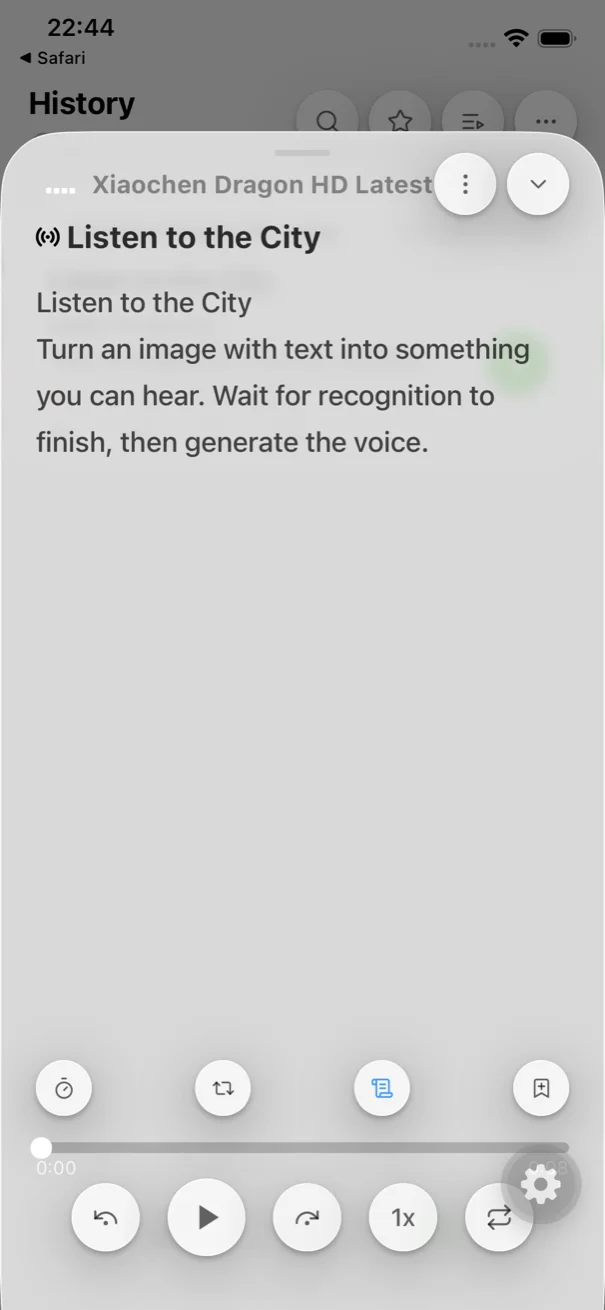
Dedicated to mobile listening: see the real app
No desktop bloat or intrusive upsell prompts. An interface built for continuous listening, synchronized subtitles, and unhindered audio export.
Synchronized Subtitle TrackingFollow along with word-level highlighting, jump between sentences, and enjoy locked-screen playback.
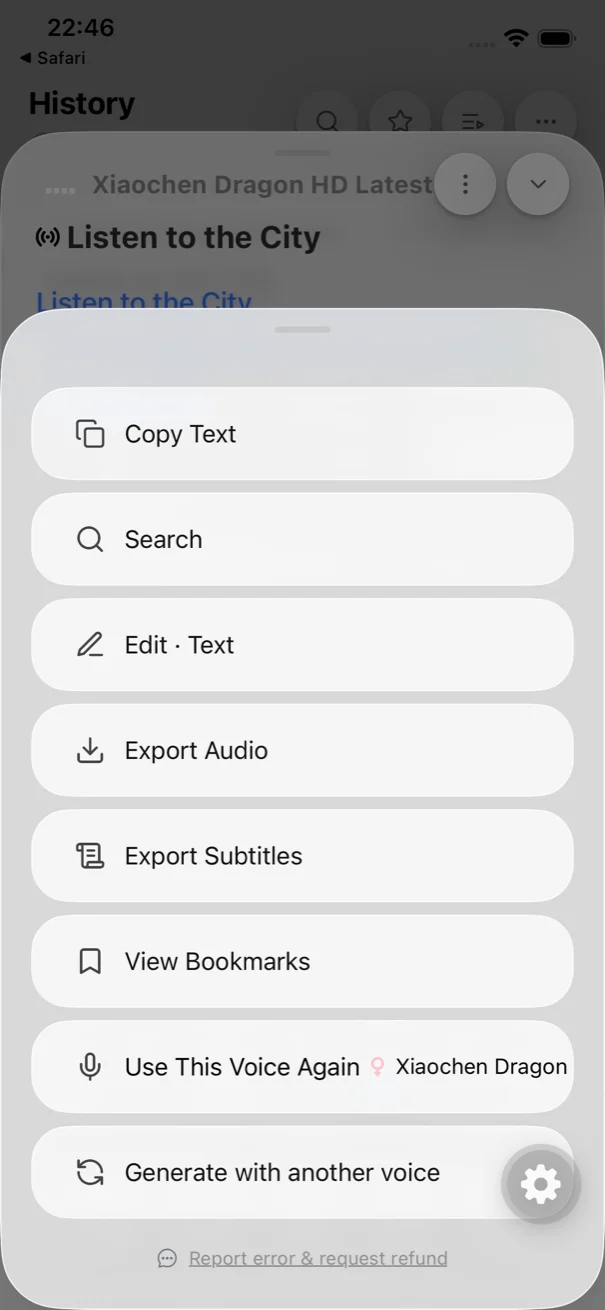
Native Audio & Subtitle ExportKeep your audio forever. Standard users can export audio files and SRT subtitles directly to iOS Files.
Pricing Transparency: $3.99/Month vs. $13.90 to $25.90/Month
NaturalReader's monthly plans start at $13.90/month (Lite) and climb to $20.90 (Plus) or $25.90 (Pro) to unlock higher-quality voices and voice cloning.
Hearem Standard is priced at just $3.99/month, providing access to top frontier AI voices and audio/subtitle export without paying for heavy desktop suites you don't need.
NaturalReader originated as a Windows desktop utility in the 2000s, and its mobile apps still reflect that complex, multi-window legacy.
Hearem is designed from the ground up for modern iPhone ergonomics: smooth background audio playback, Lock Screen controls, smart long-text splitting, and native Files integration.
Frontier AI Voice Models vs. Proprietary Tiered Tiers
NaturalReader divides its voices into Free, Plus, and Pro tiers, requiring higher-tier subscriptions for natural cadence.
Hearem partners directly with leading AI voice providers (MiniMax, ElevenLabs, Qwen, Azure Dragon HD), bringing the state of the art in speech synthesis to your personal reading library.
Compare neural speech rhythm and natural inflection right here, or copy this test sentence into both apps on your iPhone:
Listen Online: Real AI Neural Voice Audition
Click any voice to preview. Spoken audio matches the transcript word-for-word.
Current Transcript (ElevenLabs · Bella)
“Clear narration gives thoughtful ideas room to breathe. Listen at your own pace, return to the important parts, and keep what stays with you. Make space for the ideas that deserve your attention.”
01ElevenLabsBellaNatural & Expressive
~12s
02AzureJenny Dragon HDWarm & Inviting
~11s
03ElevenLabsFionaRelaxed Podcaster
~12s
04AzureAdam Dragon HDDeep & Thoughtful
~11s
05ElevenLabsVinceConfident Narrator
~10s
06QwenSerenaCalm & Smooth
~12s
Suggested Self-Test: Mixed-Language Paragraph to Copy
今天的 meeting starts at 3 PM. Please review the notes before Friday. 次の会議は金曜日です。
Copy the text above into both apps on your phone to compare code-switching and pronunciation.
Import a complex PDF document: Check how cleanly each app extracts clean text without cluttering playback with page headers.
Listen to natural pauses: Notice how modern AI voices breathe and pause naturally between clauses compared to legacy engines.
Check the audio export workflow: See how easily you can save an audio file to your device's Files app.
Questions before you switch
Is Hearem a good alternative to NaturalReader for iPhone?
Yes. If your goal is listening to PDFs, web articles, and books on your iPhone with natural-sounding AI voices, Hearem offers a much faster, more focused mobile experience at $3.99/mo compared to NaturalReader's $13.90+/mo.[1][3]
How does pricing compare between Hearem and NaturalReader?
NaturalReader Personal starts at $13.90/mo (Lite), $20.90/mo (Plus), and $25.90/mo (Pro). Hearem provides free everyday listening with Apple voices and a transparent Standard plan at $3.99/mo.[2][3]
Can both apps export audio files?
Yes, but with different approaches. NaturalReader provides MP3 conversion subject to monthly character allowances per tier. Hearem Standard natively exports both audio files and synchronized SRT subtitle files to iOS Files.[1][5]
Does NaturalReader offer voice cloning?
NaturalReader offers voice cloning on its Plus ($20.90/mo) and Pro ($25.90/mo) plans, limited to 2 custom voices; it is excluded from Lite. Hearem Standard supports voice clone reading for authorized voices.[1][3]
Sources and verification scope
Features and pricing may vary by version, region or plan. We have not tested every voice. Send a correction with the app version and workflow when documentation and behavior differ.